

Guide · Itineraries

Itinerary software for tour operators: documents from the booking.

An itinerary is the document a traveler reads most and trusts completely. For a multi-day operator it exists twice: once to sell the trip and once to operate it. This guide explains the two kinds, why generating them from confirmed services beats building them by hand, and how Tourcube produces them.

Definition

What is tour operator itinerary software?

Tour operator itinerary software produces the day-by-day documents a trip needs, proposal itineraries while selling and departure itineraries and final documents while operating, from the services actually booked, so the document and the confirmed trip cannot drift apart.

The phrase covers two very different products. Standalone itinerary builders are design tools: they make attractive documents from information someone types in. Itinerary generation inside tour operator software starts from the other end, with the segments on a proposal or booking, and adds the narrative, images, and design around them. This guide is about the second approach and why multi-day operators tend to need it.

Two documents

The proposal itinerary and the departure itinerary

DocumentWhenBuilt fromWho reads it
Proposal itineraryWhile selling a custom trip, one per proposal versionThe proposal's day-by-day segments, package pricing, inclusions, and termsThe client or agent deciding whether to book
Departure itineraryOnce a scheduled departure is set, refined as it approachesThe trip's itinerary content and the departure's guides, hotels, and timingsEvery traveler on the date, and the guide
Final documents and timingsShortly before departureConfirmed segments, air, contacts, meeting points, pre-departure informationThe traveler, the guide, the advisor
Trip planner and pre-departure informationBetween booking and travelTrip-level content: packing, health, visas, what is includedThe traveler preparing for the trip

The proposal itinerary has to sell; the departure itinerary has to be right. In a well-designed system they are the same machinery pointed at different records: the proposal's segments in the first case, the booking's or departure's confirmed segments in the second. How proposals are built →

The choice

Itinerary builders versus itineraries generated from the booking

Standalone builders are popular, and for a travel advisor assembling a trip from a few suppliers they can be the right tool. The problem for an operator appears at scale and over time.

Standalone itinerary builderGenerated from the booking
Starting pointA blank document; services typed inThe proposal's or booking's segments
When a hotel changesSomeone edits the document, if they rememberThe segment changes; the next document reflects it
Confirmation statusNot known to the documentVisible per segment while the document is produced
Narrative and imagesWritten or pasted per itineraryDrawn from a content library per property and per trip
VersionsCopies of the fileOne per proposal version, kept on the quote
Group departuresOne document per traveler, maintained separatelyOne departure itinerary, released to every booking on the date
Where it landsEmail attachment or a separate appThe guest portal, the guide portal, and the booking's document history

Drift is the real risk. The itinerary a traveler carries and the services a vendor confirmed are supposed to be the same trip. When the document is generated from the confirmed segments, they cannot be different. Segments and confirmations, explained →

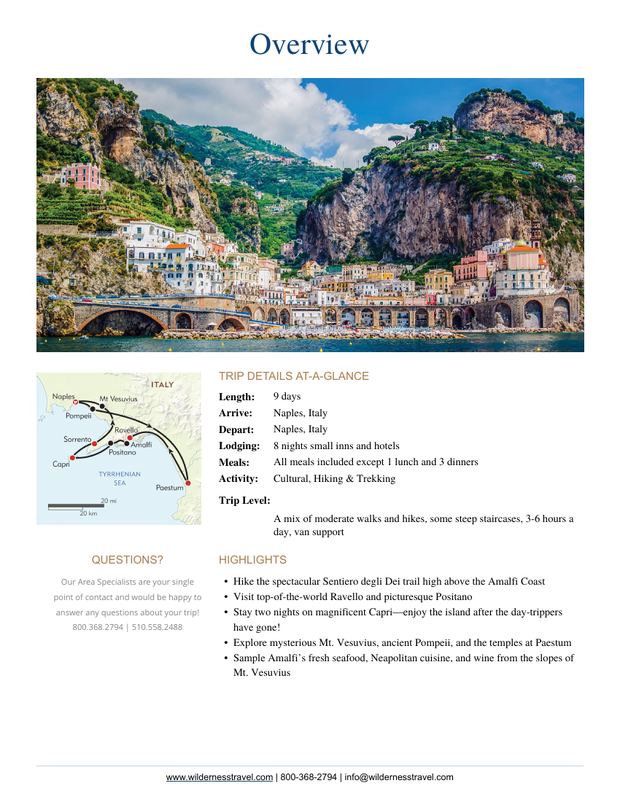
A branded itinerary cover and overview page produced by Tourcube. The design template is the operator's; the content comes from the trip and its confirmed services.

The result

Your brand on the cover, the booking underneath

What the guest receives should look like the operator, not like software output. Tourcube generates brand-personalized proposal itineraries and final timings from live trip and departure data, using itinerary templates, pre-defined content, and brand-specific PDF design templates.

  • Departure-specific itineraries for group tours, managed and printed efficiently
  • Trip inclusions and optional services clearly specified
  • Customized departure itineraries and trip planners as guest-facing documents
Content

Where the words and pictures come from

Generation only works if the descriptive content already lives somewhere. Two places supply it.

The vendor's content library

Each property carries descriptions, meal information, directions, check-in details, and images. When a hotel is a segment on a proposal, its content is available to the itinerary without being written again.

The trip's seasonal content

Scheduled trips carry itinerary content and seasonal content managed per trip, so a departure itinerary picks up the right text for its season, and the same content feeds the website when the trip is published.

Templates and design

Itinerary templates and pre-defined content set the structure; brand-specific PDF design templates set the look. Co-branded and white-label versions serve agency partners.

Segment itinerary blocks

Each segment can carry its own itinerary blocks, so a private guide day or a special transfer is described where it happens in the trip.

Delivery

How itineraries reach the traveler

Evaluation

What to expect from itinerary software for tour operators

See itinerary documents on the Guest Experience page →

Questions

Itinerary software: common questions

What is tour operator itinerary software?

Tour operator itinerary software produces the day-by-day documents a trip needs, proposal itineraries while selling and departure itineraries and final documents while operating, from the services actually booked, so the document and the confirmed trip cannot drift apart.

Do we need a separate itinerary builder?

Not if the reservation system generates itineraries from its own segments. Standalone builders are good at presentation, but the itinerary has to be retyped from the booking and kept in step by hand when a hotel or a date changes. In Tourcube the itinerary is a view of the proposal or booking, with templates and a content library supplying the narrative and images.

What happens when a service changes after the itinerary is sent?

The segment changes on the booking, and the next itinerary produced from it reflects the change. Because the document is generated rather than edited, there is no separate copy to update or forget.

Can we use our own design?

Yes. Tourcube supports itinerary templates, pre-defined content, and brand-specific PDF design templates, so what guests receive looks like your brand rather than software output. Co-branded and white-label versions are available for agency partners.

Can guests get the itinerary on the web or on their phone?

Proposals can be delivered as secure web-view links, final documents are released to the mobile-friendly guest portal, and Tourcube Version 8 adds itineraries published as private web pages.

What is the AXUS integration?

AXUS is an itinerary experience used by travel advisors and their clients. Tourcube generates final trip timing documents and syncs them to the AXUS itinerary automatically, so an advisor's client sees the operator's confirmed trip in the app they already use.

Does Tourcube produce itineraries?

Yes. Tourcube generates brand-personalized proposal itineraries and final timing documents from live trip and departure data, departure-specific itineraries for group tours, trip planners and pre-departure documents, and publishes them to the guest portal and the web.

Go deeper

Tour operations, subject by subject

All resources →

These guides explain how multi-day tour operations work and what software should do about it. Start with the overview, or go straight to the part of the business you are thinking about.

Tourcube
Start the conversation

Send us an itinerary you sent last month.

We will show you the proposal and the final document generated from the same trip in the actual product, in your design, and give you an honest read on fit.

Book a demo